¶ Overview
One of the easiest ways to begin learning SnapPlus V3 is to start with an existing SnapPlus database from our desktop software (SnapPlus2). SnapPlus V3 has an import feature on the home page that will automatically bring data from your SnapPlus 2 (v20.4) database into V3.
¶ Pre-requisite: Imported database must be from SnapPlus2 v20.4
The import feature will only work if your plan has been saved using v20.4 of the SnapPlus 2 desktop software. You can check which version of SnapPlus2 you are currently running by opening SnapPlus2 and looking in the upper left hand corner.

If you are using a version other than v20.4, you can find more information and download v20.4 here.
After downloading and installing v20.4, follow these steps to get your database updated:
- Open your SnapPlus database by navigating to the location on your computer where it is saved and double-clicking.
- In the bottom left-hand corner, you will see SnapPlus performing a series of checks and updates including "Repair by version". Wait until the updates are complete.
- Close SnapPlus—it will save automatically. You are now ready to import to V3!
¶ Import
When you import a SnapPlus 2 (v20.4) database to the SnapPlus V3 website, we automatically extract the data from your farm and convert it to the structure and format needed in V3. To import:
- On the home page, click Drop down arrow next to New farm
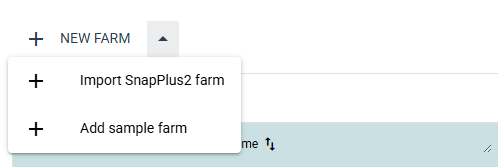
- Click Import SnapPlus 2 farm
- Click Select .snapDb file
- Navigate to the location on your computer where your database is saved. Select the database and click Open
- Wait for the blue progress bar to finish moving across the bottom of your screen. If there are no issues, you will get a message saying that the conversion completed successfully.
- Look at the "Open an existing farm" table and click the name of the farm you just imported to open the imported farm.
¶ Conversion issues
The vast majority of data from your SnapPlus2 plan will be automatically extracted when you use the import feature. However, you may see a pop-up message about conversion issues. This message will list the field(s) with issues and a general description of the problem.
¶ Q&A
¶ Why are some application rates different than they were in version 2?
In general converted application rates should be the same as they were in version 2. For farms that use daily logs (application records) there are two cases where the application rate may appear different in V2 compared to V3:
¶ Example 1: When you have multiple daily log entries to one field with the same crop year, season, source, and spread method
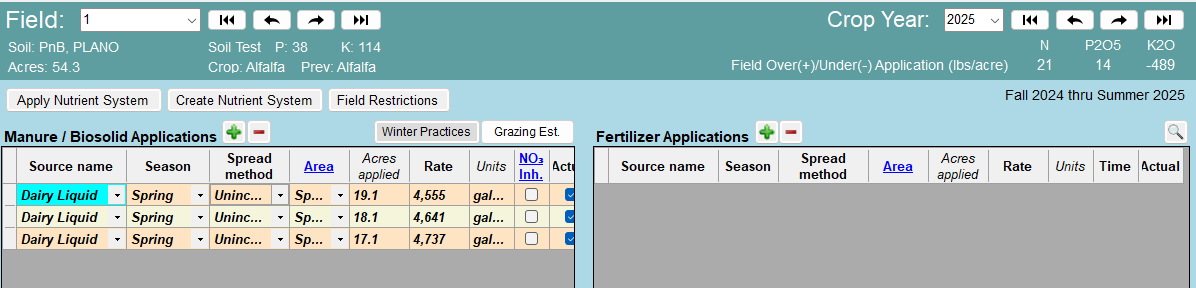
When manure is hauled to a field over several days, there may be multiple log entries that represent applications to different portions of the field. SnapPlus V2 showed each of these log entries as separate rows in the Nutrient Application Planner as shown below.

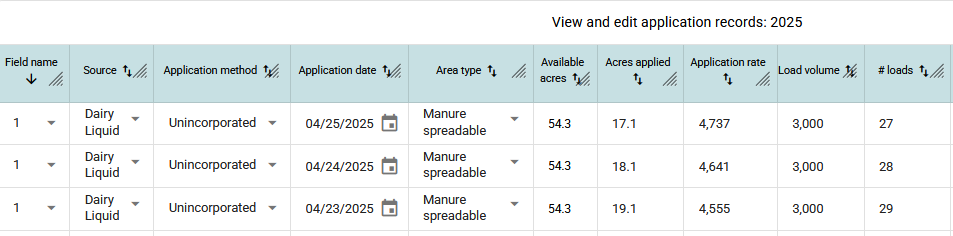
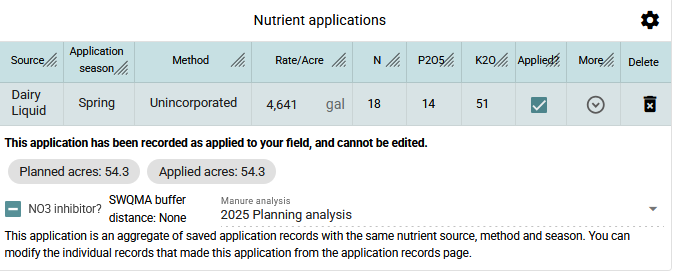
SnapPlus V3 combines multiple log entries that share the same crop year, source, season, and application method. When the example above is converted to V3, the daily log entries appear the same in the V3 "Daily Log" tab, but in the Nutrient Application Planner a single application rate is shown. This rate is calculated as the average application rate and nutrient content (N - P2O5 - K2O) across the spreadable area in the field. When you expand the "More" menu for an application that originates from daily log records, you see a reminder that V3 has aggregated multiple records to arrive at the displayed application rate and nutrient content.
¶ Example 2: When cropping acres and manure spreadable acres differ for a field
When a partial field application is recorded in SnapPlus V2, the application rate displayed in the Nutrient Application Planner matches the application rate in the record and the acres displayed reflect the acres in the record. However, for the purpose of calculating the N-P2O-K2O values for nutrient accounting, partial field applications are averaged across a field's cropping acres.
When converting partial field applications from V2 to V3, the V2 rate is used to avoid large discrepancies in the nutrient accounting.
For partial field applications entered in SnapPlus V3 (not converted from V2), both the spreading rate and N-P2O-K2O rate per acre are averaged across the appropriate spreadable acres in the selected area type.
The area types include:
- Spreadable
- No winter (winter manure prohibited)
- No manure (manure prohibited)
¶ How to fix invalid stored rotations
In version 2 some stored rotations may need to be updated before they can be converted. Version 2 will automatically make these updates when viewing them in the Rotation Editor. You can open the Rotation Editor in version 2 by following these steps:
- Open version 2
- Click Tools at the top of the screen
- Click Rotation Editor
- View the invalid rotation(s)