¶ Adding and Modifying Soil Test Data in SnapPlus V3
The soil tests screen is where the user can add new soil tests and samples, along with view any test and sample data the user has imported.
¶ Selecting a Field
At the top of the page are some controls to select fields and, if there is no soil test data on the field, to choose for SnapPlus to use default soil test data when computing nutrient recommendations. This option is only available if you are awaiting soil test data but need to start planning. Using default soil tests is not a replacement for soil test in nutrient management planning. If the default soil test is in use, a warning will appear on the Management Page until soil test data is entered.

Note that fields can be filtered by group or subfarm.
¶ Soil Test and Sample Data
When soil test/sample data exists on a field, it's visible in two data tables on the page:
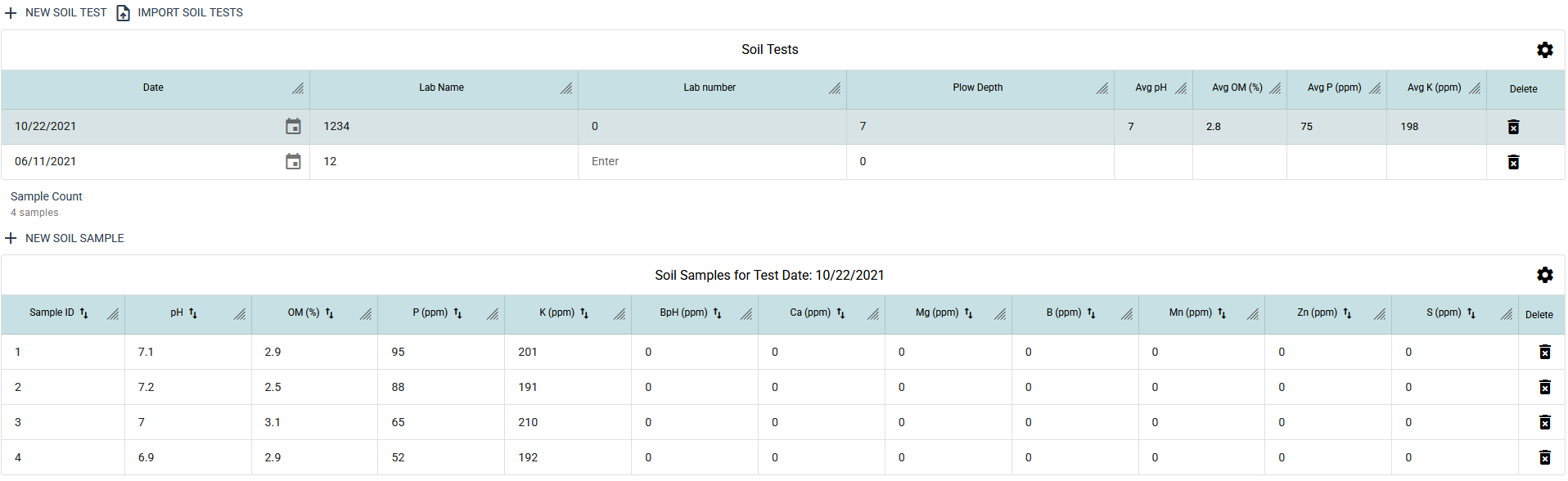
The top table displays the soil tests, and clicking on a soil test will reveal the associated soil samples. The following columns provide averages for pH, OM %, P, and K. The averages are calculated according to the guidance in the Extension Publication Nutreient Application Guidelines for Field, Vegetable, and Fruit Crops in Wisconsin (A2809, Carrie A.M,John B. Peters)
The bottom table is the list of individual samples from the soil test. Note that at least one sample per 5 acres of field is required to use the data for planning.
Notice also that there are two ways to enter soil test data.
¶ Entering Soil Test Data by Hand
Clicking the new soil test button will add a new, empty row of soil test data to the table at the top of the page. Enter any required information (date, lab name) and SnapPlus will automatically save the new soil test data to your plan.

Once the date and lab name is entered, and the data is saved, you wil be able to add the soil samples using the new soil sample buttom, which will create a new row at the top of the data table for soil samples:

Enter the the sample ID and pH, and any other information, and soil sample data will be automatically saved to the plan.
¶ Using the Soil Test Import Template
The soil test import template is a spreadsheet that allows you to enter your soil test and soil sample information into a single file that you can bring into SnapPlus.
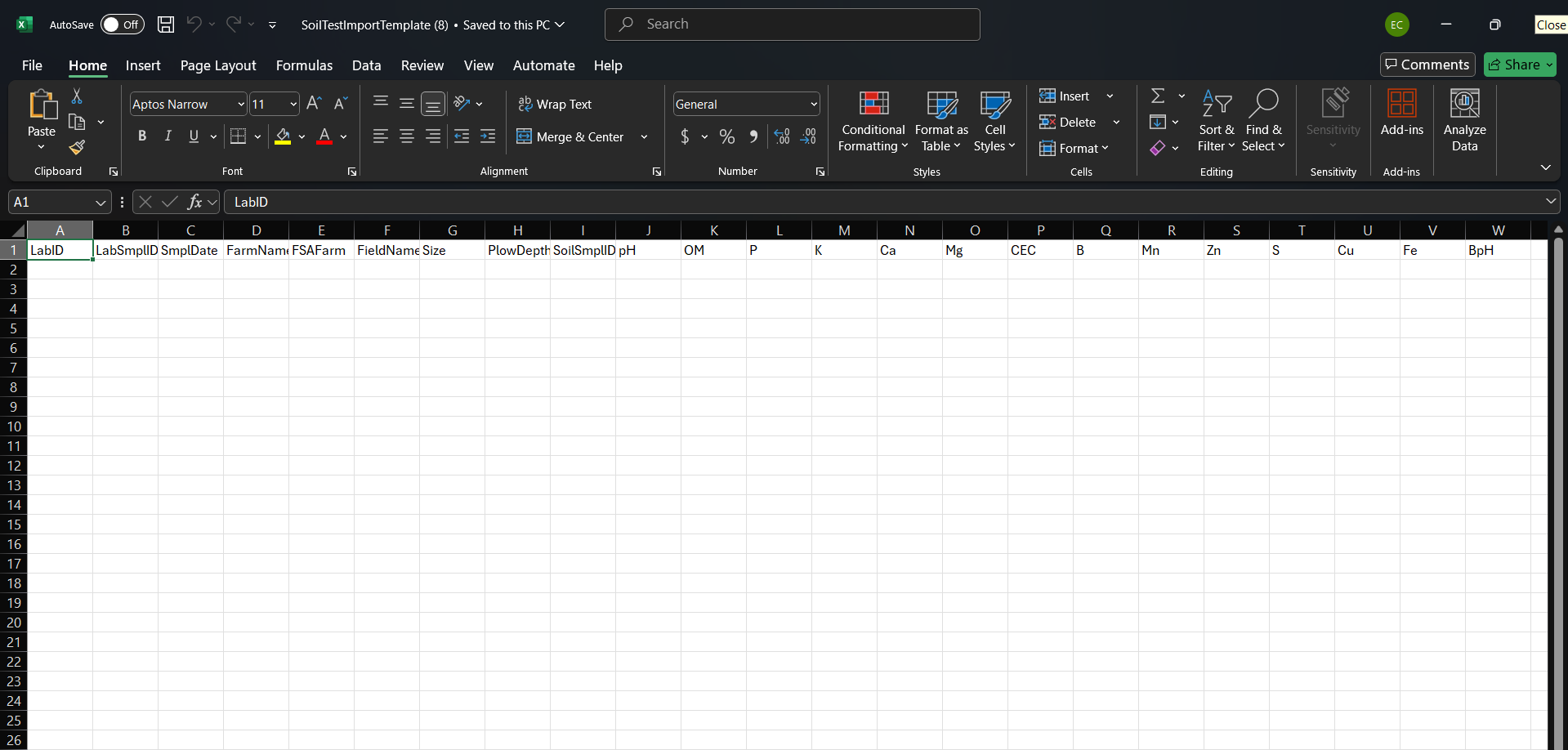
- To download the template, click Download soil test import template above the Soil Tests table. The file will be called SoilTestImportTemplate.csv, but you are free to rename it.
- Open the file, enter information about your soil samples, and save the filled-in spreadsheet.
- Back in SnapPlus, click Import soil tests above the Soil Tests table.
- Click Select file and choose the template file. You will see the table underneath populated with the data you entered in the spreadsheet.
- Review the information in the table. When ready to bring the data into SnapPlus, click Import
- SnapPlus will offer to create new fields for field names found in the spreadsheet that are not part of the nutrient management plan. In the example below, Huey, Louie and Dewey's fields will all be added to SnapPlus after importing:
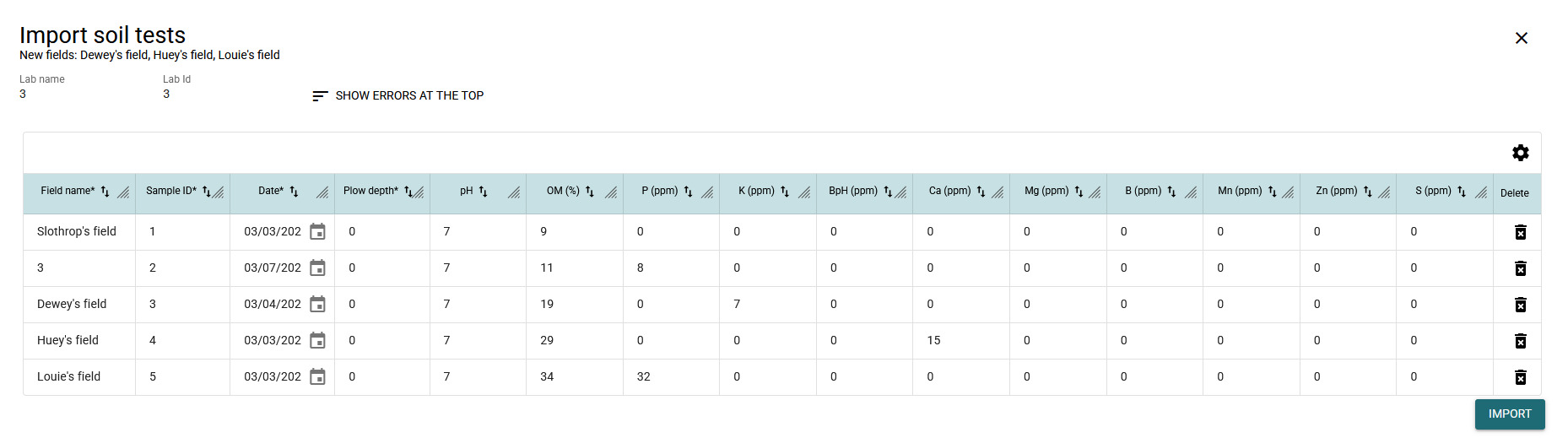
- SnapPlus will not allow the import if there is data missing or invalid in the import spreadsheet. Click Show errors at the top to easily review and fix problem data.
- If you would like to change the names of multiple fields at once in the import popup, click Bulk update field names.
- SnapPlus will offer to create new fields for field names found in the spreadsheet that are not part of the nutrient management plan. In the example below, Huey, Louie and Dewey's fields will all be added to SnapPlus after importing:
¶ Using a Supported Soil Test Import Format
Data from a DATCP-certified lab using University of Wisconsin soil testing procedures for pH, OM %, P, and K, can be copied and saved into the soil test import template. These are calculated according to the guidance in the Nutrient Application Guidelines for Field, Vegetable, and Fruit Crops in Wisconsin.
¶ Merging Soil Tests
If you have a scenario where you have soil tests that are a few days apart, and they should really be considered one soil test, you may merge the samples into the oldest test date. To merge soil tests:
- Before you begin, consider taking a snapshot.
- Above the Soil Tests table, click Merge soil tests
- Select at least 2 soil tests you wish to combine.
- When ready to merge, click Confirm
- After a moment, the soil test with the oldest test date will contain all the samples of every test involved in the merge, and the extra soil tests will be gone.