¶ Application Records / Daily Log
The Application Records (or Daily Log, for CAFO plans) tab is available from the Records And Updates page. It contains features for importing, exporting and modifying data about nutrient applications that have already been made (application records). At the top of the page there is a year selector. Data for future plan years is not accessible on this page.
Below the year selector, the toolbar contains controls for using application record/daily log features:

¶ Entering application record data in SnapPlus
Entries can be added to the daily log by selecting the +New record button on top of the data table. This will create a new empty application:

Some data is required before applications are saved:
- Field name: Selected from a list of active fields.
- Source: Nutrient sources can be imported or configured on the nutrients page. The daily log supports both manure and fertilizer applications.
- Application method: Choose from a list of possible methods (need more info)
- Application date: When was the application made? This will be converted into an application season (details further down).
- Area type: Specify which restrictions apply to the spreading of nutrient for this application. This will control the value seen in the available acres column.
- Acres applied: Total area spread
- Application rate: This can be entered directly. SnapPlus will automatically calculate application rates if total amount and acres applied are both specified.
Entering both load volume and number of loads will calculate a total amount. Notes and weather can be recorded by clicking more.
¶ Importing application Records
SnapPlus can upload application record data from Excel workbook (.xls or .xlsx) files. The download import template button will generate a properly formatted spreadsheet and save it to in the Downloads folder with a file name containing the name of the plan and the date that the template was generated.
¶ Using SnapPlus application record import template
The template file has column headers corresponding to the information needed for a daily log:
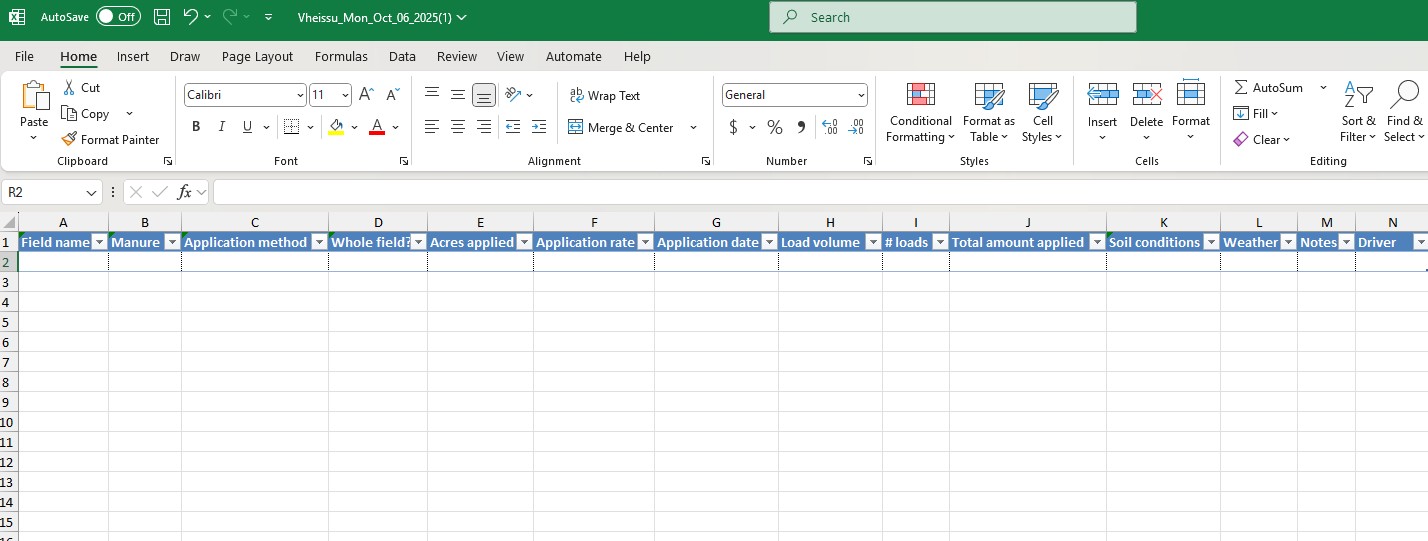
This worksheet is picky about its inputs. When entering data directly into the template spreadsheet, options are limited to data that matches what currently exists in the plan.
¶ Saving record import in SnapPlus
Once the data is prepared in the spreadsheet, selecting the Import records button in the toolbar will display a popup window. Here, valid spreadsheet import files can be selected for saving to SnapPlus database. When a file has been selected for import, the popup will look like this:
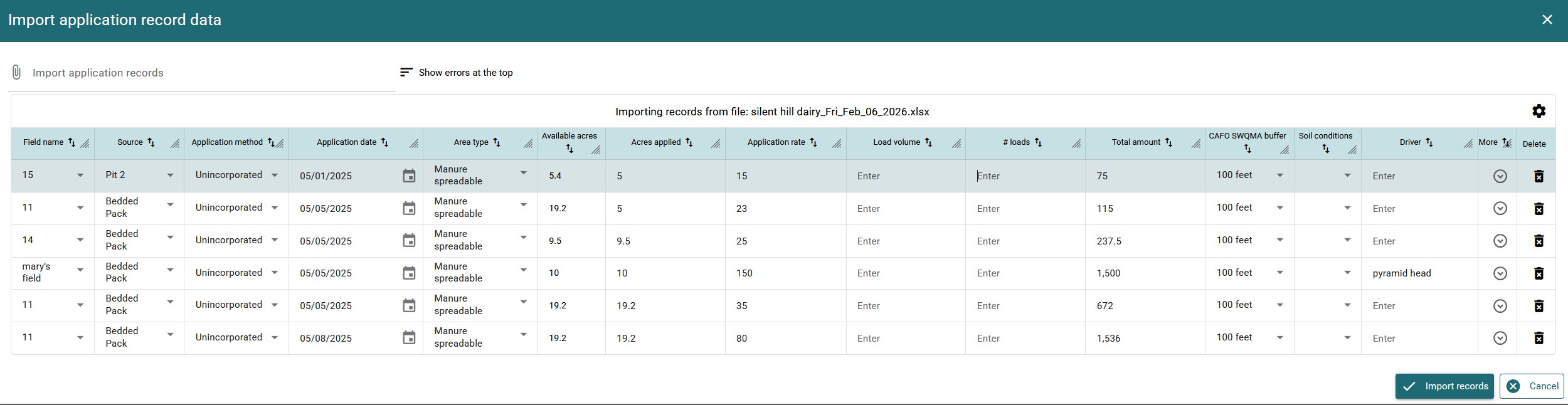
Once all the data is valid, Import records becomes available. Clicking this will save the imported record data to the SnapPlus database.
If there are no crops planned on the field and date specified in the application record import, SnapPlus will not be able to save log data. There will appear a dialog with a message to that effect:
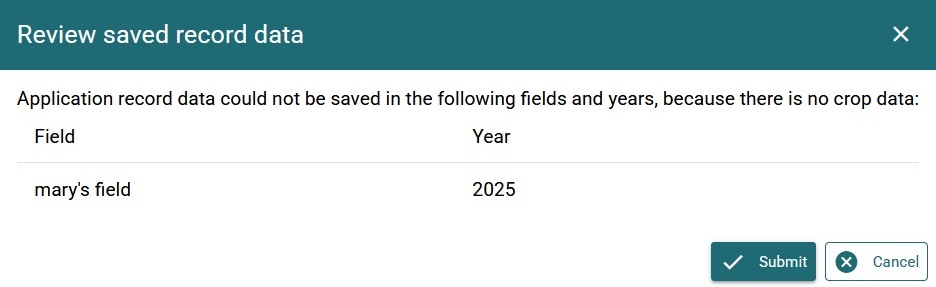
Data that has been successfully imported will display in the data table once the popup is closed:

¶ Differences between Daily Log and NAP
Daily log data is saved at the plan level. Each individual application record is saved, but may display in the Nutrient Application Planner (NAP) differently than it does in the daily log:
¶ Nutrient application seasons are automatically assigned by SnapPlus using the application record date and pre-configured dates.
SnapPlus references the table below when saving application records:
| Month | Application Season |
|---|---|
| January | Winter |
| February | Winter |
| March | Winter if before March 16 OR in CMZ01 OR soil is frozen. Spring if after March 16 AND soil not frozen. |
| April | Winter if before April 15 AND soil frozen AND CMZ04. Spring if after April 15 OR CMZ01 OR soil not frozen. |
| May | Spring |
| June | June if crop is the first crop planted in the crop year AND the crop is Established, April-May, June or Mid-Summer planted. June if crop is the second crop planted in the crop year AND the crop is April-May or June planted. Mid-Summer otherwise. |
| July | Mid-Summer |
| August | Mid-Summer if crop is Established or Mid-Summer planted. Late Summer-Fall otherwise. |
| September | Late Summer-Fall |
| October | Late Summer-Fall |
| November | Late Summer-Fall |
| December | Winter if soil is frozen. Late Summer-Fall otherwise. |
¶ Application record data may be aggregated
If application records are on the same field, in the same year and season, using the same source and application method, the NAP will display only one application with the application rates and nutrients summed up.
For example: there are two entries in the Daily Log for unincorporated springtime applications from Pit 2 on April 3, 2023. Each was applied to the whole spreadable acreage possible at a rate of 5000/acre:

In the NAP, this will display as one applied application, with an application season that should include the application's recorded date(s):

¶ Nutrient application rates for an individual recorded application may be different on the NAP.
When entering application record data, an amount of applied acres can be specified that may be less than the total spreadable acreage on the field or restricted area.
In this example, 50,000gal of manure from Pit 2 are going on 100 acres of a field, meaning an application of 500 gallons per acre. Note that there are 105 acres available for spreading:

Application rates in the NAP are then calculated dividing the total amount by the available acres. In this example, 50,000gal application will appear in the NAP with an application rate of 50,000/105 = 476:

¶ Setting manure analysis by date range
Planners may have manure analysis data that should be used when checking compliance for applications made within some period of time (for example, an analysis in Spring 2025 and a different one in June 2025). SnapPlus offers a way to configure manure analysis data so that it can be used to calculate nutrient recommendations correctly based on the time that the nutrient was applied. Clicking the Manure analysis settings button will open a dialog window where these settings can be adjusted:
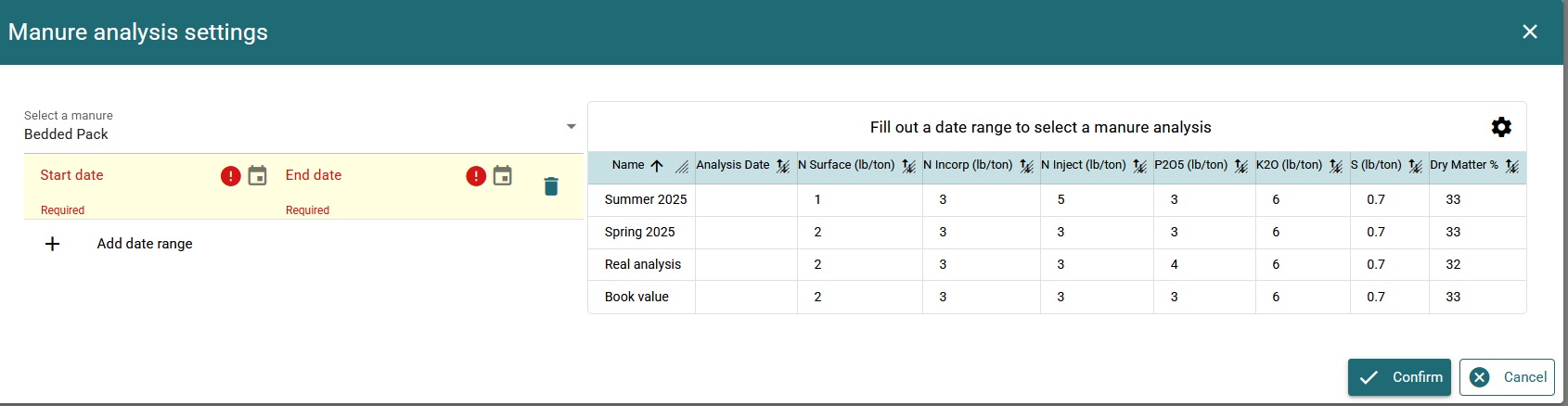
To configure SnapPlus to use the Spring 2025 analysis to compute nutrient recommendations for applications that were made roughly in the Spring of 2025, select an appropriate start and end date to mark the season. Then select Spring 2025 from the data table on the righthand side. SnapPlus will automatically save these changes:
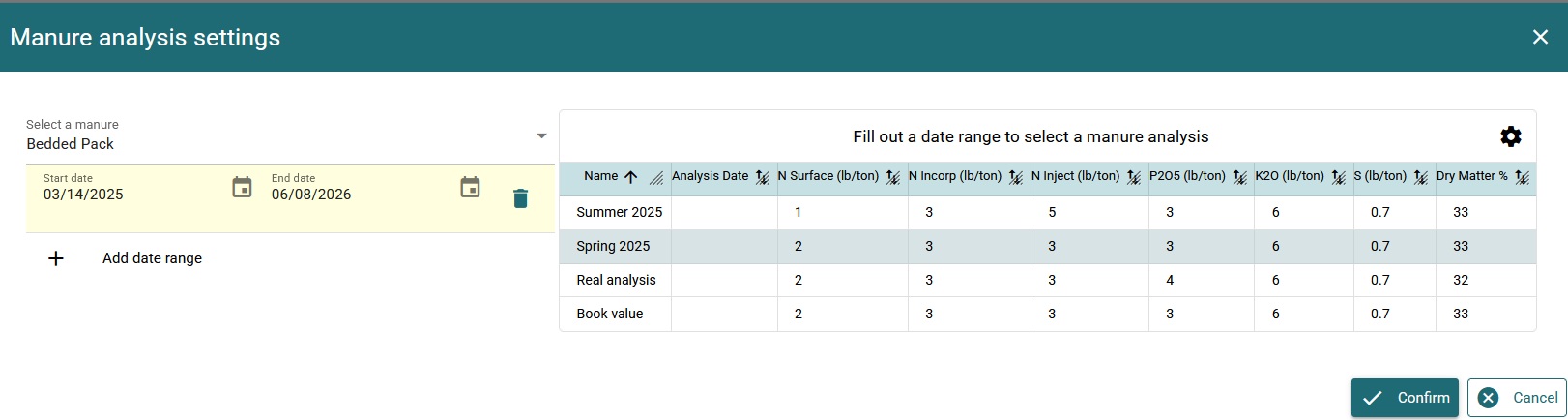
In this case, SnapPlus will automatically update all Bedded Pack applications made between March 14, 2025 and June 8, 2025, in order to recalculate nutrient balances using the breakdown of nutrient specified in the newly selected analysis. Spring 2025 will display as the name of the manure analysis in the NAP for any of these applications.